
Overview
This page is how to add a SAML 2.0 identity provider.
eAdm is the SAML service provider. The customer gives eAdm their identity provider's metadata. eAdm gives back one service-provider metadata document. Users start at the eAdm login page. eAdm accepts the response only when eAdm asked for that sign-in.
|
Item |
Detail |
|---|---|
|
Bindings eAdm accepts from the identity provider |
HTTPS. HTTP-Redirect is used for sign-in when the metadata lists it. Otherwise HTTP-POST. |
|
Response binding |
HTTP POST only. HTTP-Redirect is not used for this callback, and HTTP-Artifact is not supported. |
|
Identifiers |
One only: UPN, email, or national ID |
|
Single logout |
Supported, from eAdm and from the identity provider |
|
Sign-in started at the identity provider |
Rejected. The user starts on the eAdm login page. |
|
Encrypted assertions |
Not supported. A response that encrypts the assertion is rejected. |
Add a SAML provider
On the customer, open Single Sign-On and add a provider. Choose SAML 2.0.
Connection
-
Enter a display name. This is the login-button text. Example:
Fableton AD FS. -
Copy the service-provider metadata URL or download the file, and import it at the identity provider. eAdm signs the sign-in request and the logout request with a certificate in the service-provider metadata. The metadata URL on the tab is public. The identity provider, or a browser on an admin machine, must be able to open it if you subscribe to the URL instead of importing a file.
-
Provide the identity provider metadata in one of two ways:
-
URL. An absolute
<https://> address, at most 1000 characters, with no username or password in the URL. The host must be publicly reachable. Private, loopback, and link-local addresses are rejected. -
File. The metadata XML, at most 256 KB. Use a file when the metadata URL is internal.
-
Wait until eAdm shows the parsed entity ID, sign-in URL, and signing certificate. You cannot continue without a successful parse.
eAdm reads the entity ID, the sign-in URL, the logout URL, the NameID format, and the signing certificates. An encryption certificate in the file is ignored. A sign-in or logout URL that is not HTTPS is ignored. The signing certificates shown here come from the metadata. To replace them, upload new metadata or refresh from the URL. There is no separate certificate upload.
The same entity ID cannot be added twice on one customer.
If you save a public metadata URL, eAdm refreshes that document about once a day, and about once an hour during the last day before the metadata expiry. A failed refresh keeps the metadata already stored. If the metadata has an expiry, there is no refresh URL, and that date has passed, sign-in stops until you upload a new file.
Security
|
Setting |
Default |
Range |
|---|---|---|
|
Require a signed assertion |
On |
Leave this on unless the identity provider cannot sign the assertion. |
|
Require a signed response |
Off |
Turn on when the identity provider signs the response and you want that check. |
|
Clock skew |
5 minutes |
0 to 5 minutes. This is how far the identity provider's clock may differ when eAdm checks the assertion lifetime. |
eAdm does not decrypt assertions. The certificate in the service-provider metadata is for signing requests. If the identity provider encrypts the assertion, sign-in fails.
Attributes
Map one claim to one eAdm field.
|
eAdm field |
What happens at sign-in |
|---|---|
|
UPN |
The claim value is compared with UPN and email on active users in this company. Exactly one user must match. Two matches fail the sign-in. |
|
|
Same lookup as UPN. Exactly one user must match. |
|
National ID |
The claim value must equal the national ID stored on the user, in the same format. When more than one active user has that number, eAdm shows a page where the person chooses which user profile to open. |
UPN and email use the same lookup. A value that matches one user's email and another user's UPN is two users, and sign-in fails.
The claim box lists attribute names found in the metadata. You can also type a claim URI that the metadata does not list. The identity provider must actually send that claim.
To use the SAML subject (NameID) as the identifier, type nameid. That is accepted only when the metadata NameID format is email or unspecified. A persistent NameID is an opaque value that eAdm cannot use to look up a user. A transient NameID changes every sign-in. Neither can be the identifier.
NameID is still required for single logout, even when the identifier is a different claim. Logout needs one NameID. It does not have to be the claim that finds the user.
National ID is sensitive. Use UPN or email unless the customer has a reason to release the national ID.
Save, enable, and role
Save stores the provider turned off. It stays off the login page until you enable it from the list. Leave it off and run Test on Single Sign-On first, so a failed setup is not offered to users. The test is described in Testing .
Open an enabled provider to choose Primary or Secondary. Primary is available only while the provider is enabled. Primary makes SAML the company's main sign-in method, so these buttons are listed first.
When several SAML providers are enabled, the primary one is listed first among them. The others follow by display name.
While SAML is the primary method, the last enabled SAML provider cannot be turned off or deleted. Choose another primary method first.
Sign-in and sign-out
Sign-in
-
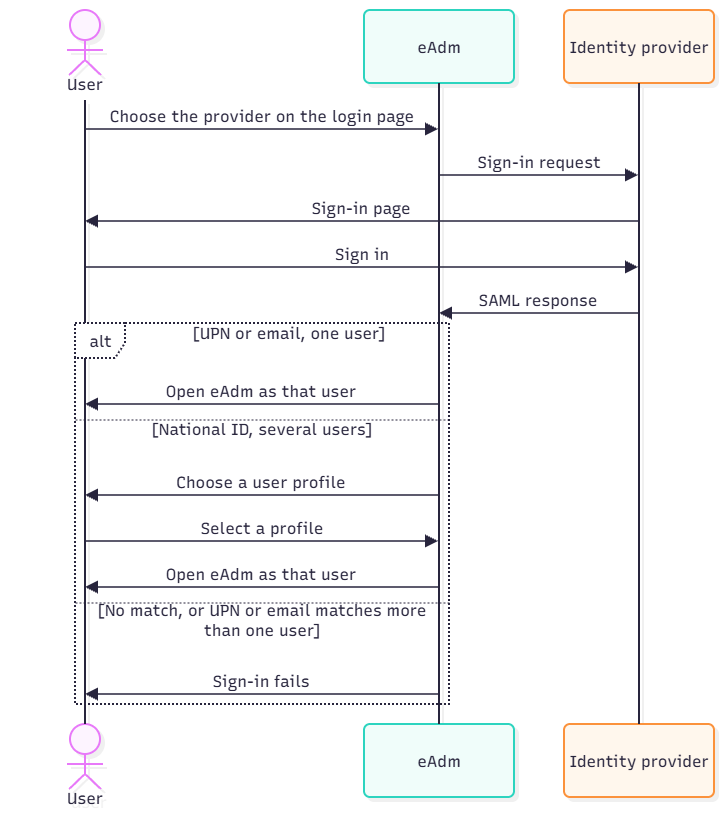
The user opens the eAdm login page and chooses the provider's display name.
-
eAdm redirects the browser to the identity provider.
-
The identity provider posts the SAML response back to the assertion consumer URL.
-
eAdm checks that this response answers the request it just sent, checks the signature against the stored signing certificates, and reads the one mapped identifier.
-
UPN or email: one matching user opens eAdm as that user. No match, or two matches, fails the sign-in.
-
National ID: one matching user opens eAdm as that user. Several matching users see a page that lists those profiles. They choose one, and eAdm opens that profile. The other matches are signed out.
A sign-in that the user started at the identity provider, with no matching request from eAdm, is rejected.
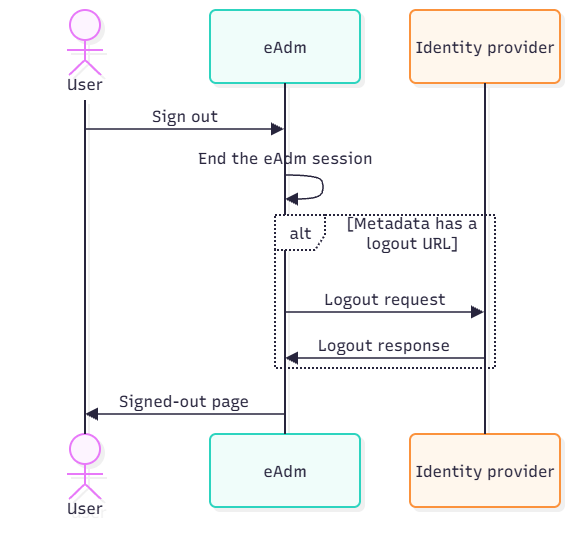
Sign-out started in eAdm
Signing out of eAdm ends the eAdm session first. When the identity provider metadata has a logout URL, eAdm then sends the browser there with a logout request. The identity provider posts the logout response back, and the browser lands on the eAdm signed-out page. When the metadata has no logout URL, eAdm returns straight to the signed-out page.
The assertion from the current sign-in must contain one NameID and a session index. Add or change that rule at the identity provider, then sign in again. Older sessions do not gain a NameID afterwards.
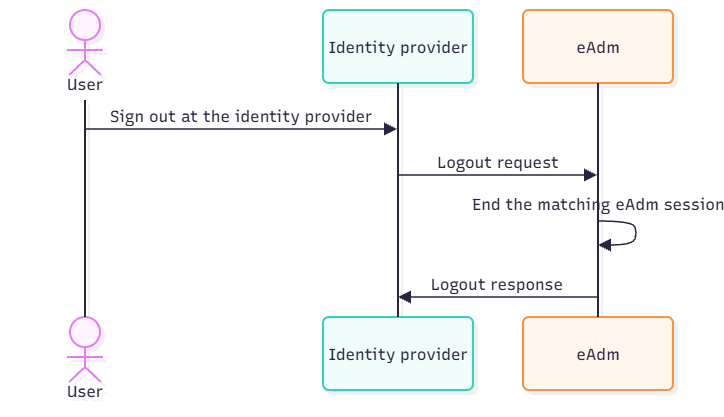
Sign-out started at the identity provider
The identity provider sends a logout request to the single-logout URL in the eAdm metadata. eAdm ends the matching session and returns a logout response. A request that matches no session still gets a success response. It does not start a sign-in.
Testing
Test on the provider row runs in its own window. It is a short-lived session that does not replace an eAdm session you already have.
eAdm matches the user and then ends that test session in eAdm. When the identity provider metadata includes a logout URL, and the assertion has one NameID, eAdm also sends a logout for that same test session to the identity provider. The row reports success only after that logout completes. Without a logout URL, eAdm still ends its own test session, but it cannot end the session at the identity provider, and the test reports failure.
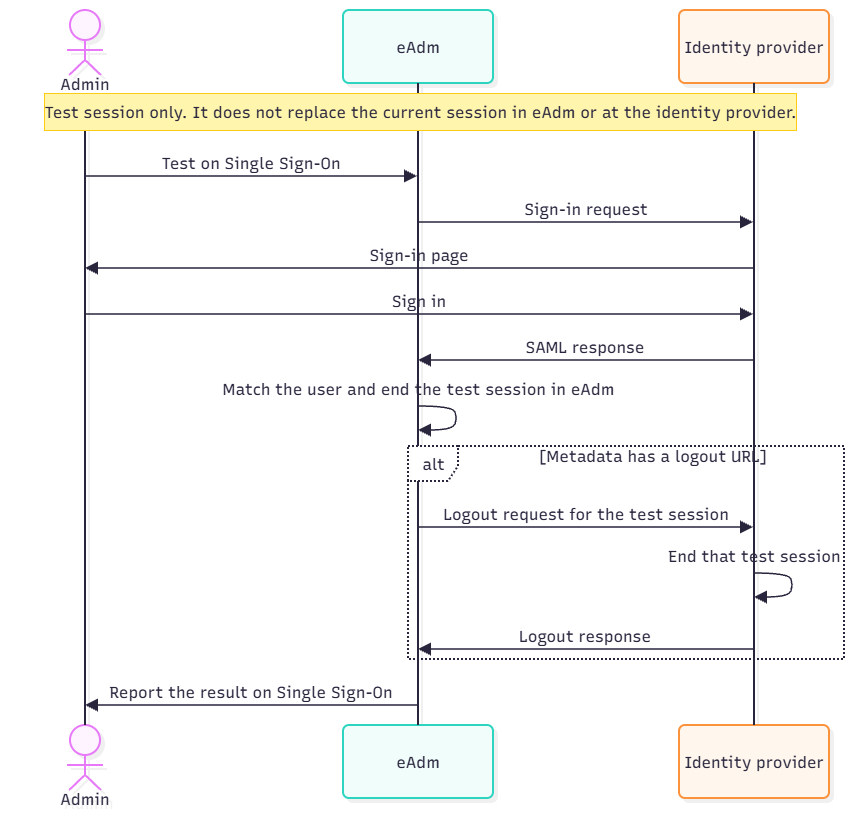
The admin test reports failure when the user was found but logout could not finish. That happens when the metadata has no logout URL, or the assertion has no NameID. Fix that, then try again. A popup blocker also fails the test.
Troubleshooting
|
Symptom |
Likely cause |
Action |
|---|---|---|
|
Metadata URL is rejected |
The URL is not public HTTPS, includes a username, or the host is private, loopback, or link-local |
Upload the XML file instead. Use a URL only when eAdm's servers can fetch it on the public internet. |
|
Parse fails or the file is refused |
The XML is not SAML metadata, or it is larger than 256 KB |
Export the identity provider's federation metadata again. Upload the public metadata only, never a private key or a PFX. |
|
Login button is missing |
The provider is disabled |
Enable the provider. |
|
Identity provider accepts the user, eAdm does not find them |
The claim URI or the value does not match, or two users match a UPN or email value |
Compare the issued claim with the user field. For UPN and email, exactly one user may match across both fields. |
|
Test says the user was not found |
No active user in this company has that identifier |
Compare the claim value with the user in this company. |
|
Several accounts share a national ID |
More than one active account has that ID |
The person chooses a profile on the sign-in page. That is expected. |
|
Test fails after a successful sign-in at the identity provider |
No logout URL in the metadata, or the assertion has no single NameID |
Add a logout endpoint to the metadata and one NameID rule. Sign in again. |
|
Sign-in fails and the assertion is encrypted |
The identity provider encrypted the assertion |
eAdm has no decryption setting. Stop encrypting assertions for this relying party, and import the current eAdm metadata. |
|
Sign-in fails around the assertion time |
Clocks differ by more than the configured skew |
Set skew up to 5 minutes, or correct the identity provider clock. |
|
Sign-in stops after a metadata expiry date |
The stored metadata is expired and there is no working refresh URL |
Upload current metadata, or set a public metadata URL. |
|
Logout ends eAdm only |
The identity provider metadata has no logout service, or the identity provider is missing the eAdm logout endpoint |
Re-import both metadata files. Confirm one NameID and a session index on a new sign-in. |
|
Signing out of the identity provider leaves eAdm signed in |
The identity provider did not send a SAML logout request, or the session was created before the NameID rule |
Use the identity provider's SAML sign-out. Confirm it has the eAdm logout endpoint. |
Certificate changes
Identity provider signing certificate. When the public metadata URL is set, eAdm refreshes it. When you use a file, download new metadata before the old signing certificate expires and upload it to the same provider. eAdm keeps every signing certificate from the file and will accept an assertion signed by any of them, which covers a rollover period.
eAdm request-signing certificate. When the service-provider panel shows a rollover, download the current metadata and update the identity provider before eAdm signs with the new certificate. Leave the previous public key in place until eAdm drops it.
Go-live checklist
- Metadata parses and shows the entity ID, sign-in URL, and a current signing certificate
- Public metadata URL saved only when eAdm can fetch it; otherwise a file, and a reminder to re-upload before certificate expiry
- One claim mapped to UPN, email, or national ID
- NameID issued for logout, one value, on a new sign-in
- Provider enabled, and primary or secondary set
- Service-provider metadata imported at the identity provider
- The identity provider is not encrypting assertions
- Admin test succeeds
- Sign-in from the eAdm login page opens the expected user
- Sign-out from eAdm and from the identity provider both end the eAdm session
Fableton Municipality (org NO999000001) is fictional.