
This document describes the integration between eAdm and Telenor CMG. The integration automates user account management in CMG by synchronizing user information from eAdm.
Overview
CMG is Telenor's telephony and directory service. Switchboard operators and colleagues use it to find people, see how to reach them, and see which part of the organisation they belong to. It also covers voicemail, an end-user portal, and activity management.
This integration automates user management from your HRM into that directory.
Examples below use Fableton Municipality, organisation id NO999000001. Fableton is fictional.
Prerequisites
Confirm these before you set up the integration:
-
Telenor has provided the VpAPI base URL, client id, client secret, and a client certificate. The certificate must be a
.p12or.pfxwith a private key. A.cerwithout a private key cannot be used. The URL looks likehttps://<host>/VpAPIand is only reachable from the customer network. -
The server that runs eAdm.Client can reach VpAPI.
-
A daily synchronization step in eAdm has at least one time before 08:00 or at or after 17:00 Swedish time, or weekend synchronization is enabled. Create, update, and delete in CMG only run outside office hours.
How the integration works
On every run, including runs during office hours:
-
eAdm.Client signs in to VpAPI and reads the CMG users.
-
eAdm copies Mobile and Extension from those users back into eAdm, when inbound flows are configured.
-
eAdm records any pending profile changes.
Create, update, and delete run only when that same step executes outside office hours. Several edits to the same user during the day become one CMG call. The latest value of each field is the one that is sent. A later removal from the template wins over earlier edits.
Once eAdm has handed the calls to the client, those calls finish even if the clock then enters office hours. The clock is read when eAdm prepares the calls, which is when the step runs, not when the sync was queued.
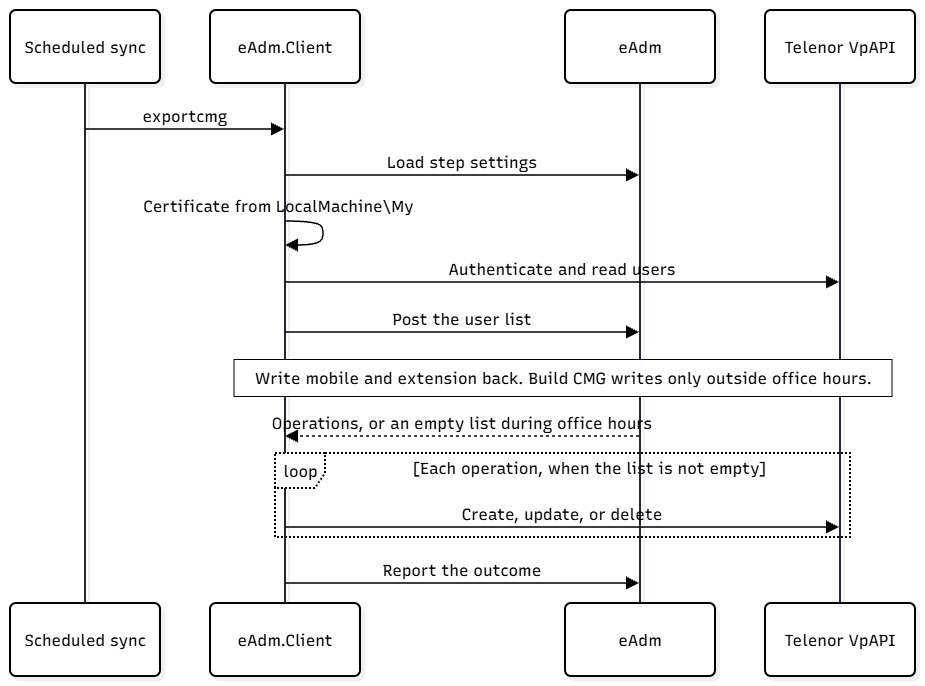
A daytime run with pending changes ends successfully. The sync step message is CMG changes are waiting for the next open run. The client log says CMG returned no operations. The changes are waiting. They are not discarded.
Matching, create, update, and delete
eAdm stores the CMG user id on the person after a successful create, and when it links an existing CMG user. The username itself is always the eAdm username. It is not an export-template target. It is written to CMG as misc item { miscNo: 8, miscText: "<username>" }.
|
When |
What happens |
|---|---|
|
The person has no CMG id yet, and a main CMG user already has that username in misc 8 |
eAdm links that CMG id and sends an update for the mapped fields. This is the merge. |
|
The person has no CMG id yet, and no main CMG user has that username |
eAdm creates a CMG user. OrgName and a numeric CustomerGroupId are required. |
|
The person has a CMG id, and that user is still in the fetched list |
eAdm updates the mapped fields. |
|
The person is removed from the export template, and the CMG user is still in the fetched list |
eAdm deletes the CMG user. |
|
The person has a CMG id, but that user is not in the fetched list |
eAdm leaves CMG alone. It does not create a replacement and does not send a delete. |
|
Two main CMG users share the same username in misc 8 |
eAdm keeps the first and logs |
A CMG user that eAdm has already deleted, or that is no longer in a customer group this step reads, is not created again when the person returns to the export template.
Only main records are used for the username match. The read still includes other records.
A create that reaches CMG and then loses the reply is picked up on a later open run if a new change is still pending and the username matches: eAdm links the existing user instead of creating a second one.
The import folder
Create places the user in the folder named by OrgName, inside the customer group named by CustomerGroupId. Use your dedicated import folder, e.g.FABLETON MUNICIPALITY\Import-AD.
While the user remains in that folder, CMG keeps only the username (misc 8). eAdm does not send title, manager, visit address, postal code, locality, or cost centre. Name, email, visibility, and the other non-misc fields are still sent.
eAdm never sends a new folder or a new customer group after create. This assumes someone in CMG moves the user out of the import folder. The next sync outside office hours then sends one update with the misc values that were held. A user who stays in the import folder never receives those values, and later changes to them are not sent until the user is moved. That update leaves the folder and the customer group as CMG has them.
The run that creates the user does not also send this follow-up update. The CMG read on that run happened before the create.
Office hours
Telenor requires that creates, updates, and deletes in CMG happen outside office hours. eAdm holds those writes to meet that requirement. The window uses Swedish local time (Europe/Stockholm), including daylight saving. That is the same clock as Norway.
|
When |
Read CMG, write mobile and extension back |
Create, update, delete in CMG |
|---|---|---|
|
Weekdays 08:00–16:59 |
Yes |
Held |
|
Weekdays before 08:00, and from 17:00 |
Yes |
Sent |
|
Saturday and Sunday |
Yes |
Sent, when a sync runs |
eAdm does not start an extra sync when 17:00 arrives. At least one sync that includes the CMG step must run outside office hours. Put that time on the daily schedule of the Synchronization step.
A schedule that sits entirely inside weekday 08:00–17:00 never writes to CMG. Weekend runs write to CMG only when weekend synchronization is turned on for that step.
Resetting an import file removes the unsent CMG changes that belong to that file.
Setup
Install the certificate
Do this on the server where eAdm.Client runs, in the computer store the client service account can read.
-
Import the
.p12into Local Computer → Personal (Cert:\LocalMachine\My). -
Grant the account that runs eAdm.Client permission to read the certificate's private key.
-
Copy the certificate thumbprint. Spaces are ignored. Store only the thumbprint on the CMG sync step.
-
Delete the
.p12from disk. The password is not stored in eAdm.
The client looks up that thumbprint, requires exactly one match, and presents the certificate on every VpAPI call, including sign-in. A missing private key, a blank thumbprint, or more than one match stops the step before any CMG call.
Step parameters
|
Parameter |
Required |
What to enter |
|---|---|---|
|
Api Url |
Yes |
VpAPI base URL from Telenor, with no trailing path beyond |
|
Client ID |
Yes |
VpAPI client id. |
|
Client Secret |
Yes |
VpAPI client secret. |
|
CMG certificate thumbprint |
Yes |
Thumbprint of the certificate in |
|
CMG customer group ids |
No |
Comma- or semicolon-separated customer group ids to read. Blank reads every group the API account can see. A value with no integer stops the step before any CMG call. |
Export template
Map eAdm export targets to CMG API fields.
|
Export target |
CMG API field |
On create |
On a later update |
|---|---|---|---|
|
Username (the eAdm username, always) |
|
Always |
Left as stored. This is the match key. |
|
FirstName |
|
Sent. Falls back to the person's given name. |
Sent when the template mapped it. |
|
LastName |
|
Sent. Falls back to the surname. |
Sent when the template mapped it. |
|
|
|
Sent when the address is not blank. |
Sent when mapped. A blank value clears the channel. |
|
Title |
|
Held. Not sent while the user is in the import folder. |
Sent when mapped. Held while the user is still in the import folder. A blank value clears it. |
|
Manager |
|
Held. Not sent while the user is in the import folder. |
Sent when mapped. Held while the user is still in the import folder. A blank value clears it. |
|
VisitAddress |
|
Held. Not sent while the user is in the import folder. |
Sent when mapped. Held while the user is still in the import folder. A blank value clears it. |
|
PostalCode |
|
Held. Not sent while the user is in the import folder. |
Sent when mapped. Held while the user is still in the import folder. A blank value clears it. |
|
Locality |
|
Held. Not sent while the user is in the import folder. |
Sent when mapped. Held while the user is still in the import folder. A blank value clears it. |
|
CostCenter |
|
Held. Not sent while the user is in the import folder. |
Sent when mapped. Held while the user is still in the import folder. A blank value clears it. |
|
OrgName |
|
Required. Exact folder name. |
Left unchanged. |
|
CustomerGroupId |
|
Required. A whole number. |
Left unchanged. |
|
ChangeBy |
|
Omitted when blank. |
Omitted when blank. |
|
VisibleInCMGWeb |
|
|
Sent only when mapped. |
|
VisibleInCMGDirectory |
|
|
Sent only when mapped. |
|
MainRecord |
|
Omitted when unmapped. CMG then treats the user as a main record. |
Sent only when mapped. |
OrgName and CustomerGroupId are used only on create. If the only change for a person is one of these two targets, nothing is sent to CMG. The change is marked done, and the sync log says had no mapped fields to update. A later change to a mapped field is sent normally.
Also:
-
Create sets
hiddenMobileNrandhiddenExtensionNrtotrue. Later updates leave both flags as CMG has them. The numbers are still copied back into eAdm when they are hidden in CMG. -
Map
VisibleInCMGWebandVisibleInCMGDirectorytotruewhen new users should show in the CMG web and directory. An unmapped create sendsfalse. -
Keywords are left as CMG already has them.
-
SMS and any address channel other than E-Mail are left as CMG stored them.
-
eAdm does not send the mobile number, extension, or calendar sync to CMG.
Example mapping for Fableton
|
Value in the template |
Export target |
|---|---|
|
|
FirstName |
|
|
LastName |
|
|
|
|
|
Title |
|
[REFERENCE;DisplayName;UserId;1;[Manager]] |
Manager |
|
[PostalAddress] |
VisitAddress |
|
[PostalCode] |
PostalCode |
|
City |
Locality |
|
[CostCentre] |
CostCenter |
|
|
OrgName |
|
|
CustomerGroupId |
|
|
ChangeBy |
|
|
VisibleInCMGWeb |
|
|
VisibleInCMGDirectory |
For OrgName, use the exact folder name from CMG, including capitalization. A second ruleset, with a literal CustomerGroupId and a ruleset that does not overlap the first, can place a different set of people in another customer group.
Mobile and extension back into eAdm
On the same template, Mobile and Extension are inbound sources. Point each one at the eAdm field that should store the CMG number. The inbound flow expression can add a prefix: eAdm substitutes the CMG number for NewValue in that expression.
Other inbound sources on this step are ignored. Title and the rest of the profile stay owned by the outbound template.
Writeback runs on every sync, including runs during office hours. It applies only to main records that eAdm has already linked to a CMG id.
Testing
Run the test on the customer server, before any live write. Test mode reads CMG, builds the operations as if the write window were open, and changes nothing in CMG. It also skips the mobile and extension writeback.
eadm.client.exe exportcmg NO999000001 test
The client log contains CMG test: N operations, none executed. and one line per operation. Confirm creates land in the import folder, merges hit the right username, and nobody who should stay in CMG is listed as a delete.
The scheduled sync calls the live command without test:
eadm.client.exe exportcmg NO999000001
First population on go-live
The first CMG export should be a full export. Run it once, when Export CMG is the next step in the sync cycle. Later runs stay deltas.
eadm.client.exe exportcmg NO999000001 full test
eadm.client.exe exportcmg NO999000001 full
full test previews the whole population and changes nothing. full assigns the export template to every person the ruleset matches, and queues a create or merge for each one. In a weekday run between 08:00 and 17:00 Swedish time, the rows are stored and the step ends with CMG changes are waiting for the next open run. The next scheduled run outside that window sends them.
Do not run full a second time while changes are still pending. It queues a second copy of each of them. The Export button on the sync step does not call CMG; it only queues the same population for the next synchronization.
To retry before the send, delete only the Export CMG step. Deleting the whole sync cycle discards unsent CMG changes for that import file.
Troubleshooting
|
Symptom |
Likely cause |
Action |
|---|---|---|
|
Sync message |
The run was on a weekday between 08:00 and 17:00. |
Wait for a sync outside that window. Confirm the Synchronization step has such a time. |
|
CMG never changes, and daytime message is absent too |
No sync runs while the window is open, or step 1100 is ordered before the delta continuation point. |
Add an evening, night, or weekend time on Synchronization. Move step 1100 down so deltas include it. |
|
|
Thumbprint missing, typed wrong, or two certificates share it. The store is |
Reimport the |
|
|
A |
Import the |
|
User calls fail with 401, sign-in may still succeed |
The certificate was not presented, or the client id or secret was rejected. |
Check the thumbprint, client id, and client secret. The client retries sign-in once. |
|
New user shows only the username in CMG |
The user is still in the import folder. eAdm does not send the other misc fields while the user is there. |
Move the user out of the import folder in CMG. The next open run sends the misc values that were held. If the user stays there, those values are never sent. |
|
User was moved in CMG and eAdm stopped updating them |
The user left every customer group this step reads. |
Add that group to CMG customer group ids, or move them back. eAdm will not recreate them. |
|
|
The template did not supply a folder name or a numeric group id for a new user. |
Map both targets. The folder name must match CMG exactly. |
|
|
The person has no eAdm username. |
Give them a username before they enter the CMG template. |
|
A field was cleared in CMG |
An update sent a blank mapped value. Blank email clears the E-Mail channel. A blank misc value clears that misc field. |
Map the target only when eAdm should own it. |
|
|
Two CMG main records share the same username. |
Correct the duplicate in CMG. eAdm keeps one of them. |
|
A rejected CMG call (HTTP 400–499, other than 401) |
CMG refused that user. The change is marked done and is not retried. |
Read the error on the object history, fix the data, and make a new change so a later open run sends it again. |
|
HTTP 401 after refresh, HTTP 5xx, or a network error |
The call did not stick. The change stays pending. |
The next open run tries again. |